Configuring Logstash as a Multi-Tenant Bulk API Ingestion Gateway
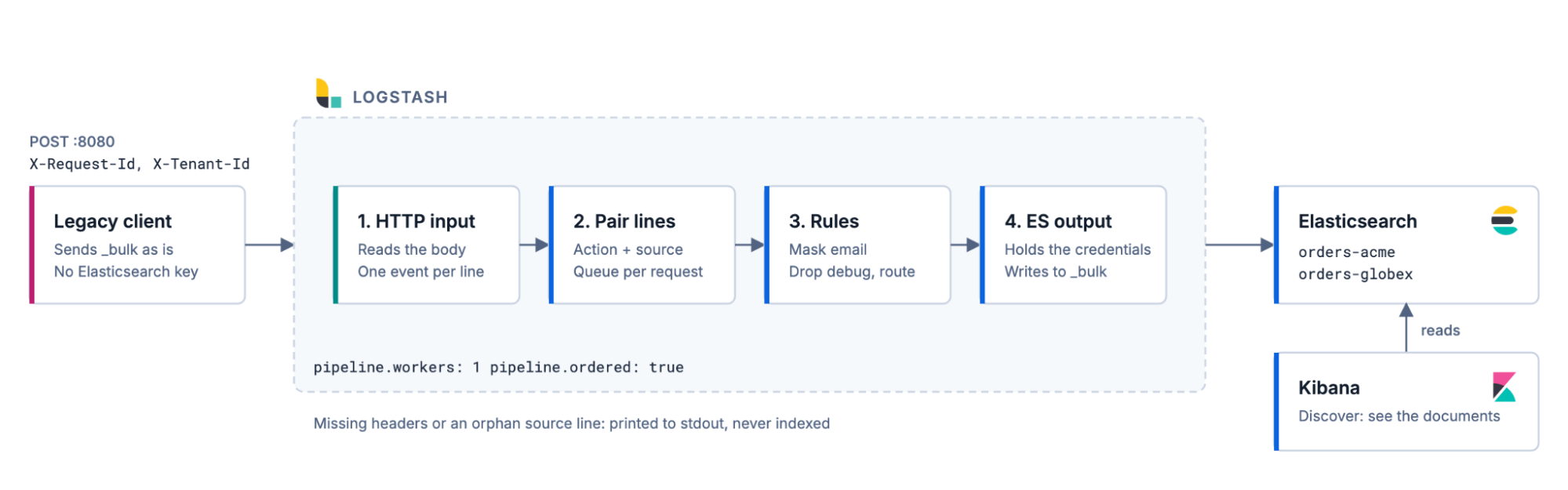
Engineering workflows often require an intermediary ingestion layer capable of intercepting and validating batch data before it reaches downstream storage. A specialized pipeline architecture allows Logstash to act directly as an Elasticsearch bulk gateway, accepting standard Elasticsearch bulk API payloads. Because bulk requests deliver two-line pairs consisting of an action command followed by a source document in newline-delimited JSON format, handling these operations requires distinct state coordination.
Pipeline Architecture and Codec Handling
Incoming network traffic enters Logstash through an HTTP input endpoint using the json_lines codec. This configuration enables the engine to process each individual line in a newline-delimited JSON stream as an independent event. In addition, ECS compatibility is explicitly disabled on the input plugin. Disabling this setting prevents default HTTP metadata structures from overwriting or colliding with user-supplied document fields.
To preserve strict sequence across operations, the gateway relies on specific pipeline execution parameters. The underlying Logstash runtime enforces strict event order by setting pipeline.workers to 1 and setting pipeline.ordered to true within logstash.yml:
pipeline.workers: 1
pipeline.ordered: true
State Management and Routing
Connecting disconnected action lines—such as index, create, update, or delete commands—with their respective payloads is achieved through an aggregate filter mechanism. The filter captures the operational metadata and document identifiers from the initial line and couples them directly to the subsequent source document line.
System Requirements and Validation
The full operational stack encompasses three containerized services consisting of Elasticsearch, Logstash, and Kibana. Testing across this environment was verified using version 9.5.6 of the Elastic stack. Running these three local containers simultaneously requires approximately 4 GB of free system memory to maintain stable operational headroom.